
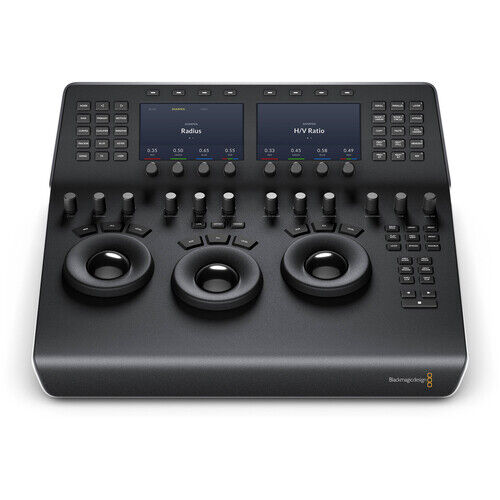
Blackmagic Design DaVinci Resolve Mini Panel with Resolve Studio Software

Items Included
- Blackmagic Design DaVinci Resolve Mini Panel with Resolve Studio Software
- Blackmagic Design DaVinci Resolve Studio (Activation Card)
- Limited 1-Year Manufacturer Warranty (on Hardware)
Key Features
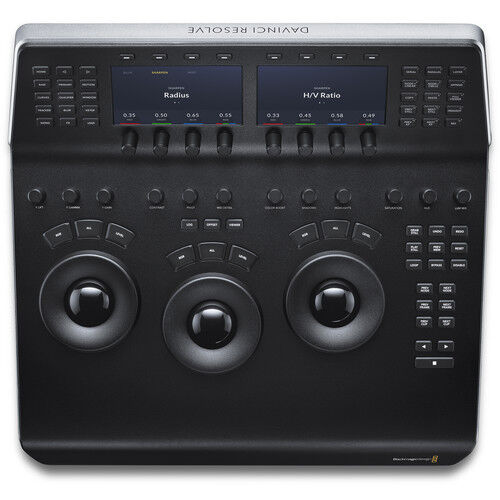
- 3 x High-Resolution Trackballs
- 12 x Primary Correction-Control Knobs
- 18 x Navigation and Transport Keys
- Dedicated Feature Buttons
- 2 x LCD Information Display Screens
- Backlit and Illuminated Buttons
- USB-C and Ethernet Interface
- Supports Mac and Windows
- Supports Select Linux Installations
Primary Correction Creative Control Knobs
Control knobs are grouped into four sets of three knobs
Luminance
- Y Lift Control: Adjust the contrast of the image in the darker areas, specifically in the Y (luminance) channel only. This adjustment allows for changing the black point without changing saturation.
- Y Gamma Control: Adjust the contrast of the image in the mid-tone areas, specifically in the Y (luminance) channel only. This control helps add depth and extra vibrancy to shots.
- Y Gain: You can reduce hot spots or tweak the whites to define a look.
Contrast
- Contrast Control: Increase contrast to make the blacks darker and the whites brighter, or decrease contrast to do the opposite.
- Pivot: Change the center of tonality about which dark and bright parts of the image are stretched or narrowed during a contrast adjustment.
- Mid-Tone Detail: Affect the contrast of regions of the image with high edge detail to increase or decrease the perception of image sharpness and definition. Often used for softening facial features, making it popular for beauty shots.
Detail
- Color Boost Control: Raise the saturation in regions of the image with low saturation while leaving properly saturated areas alone. Also known as a vibrance operation, this is useful for adding color without oversaturating the image.
- Shadow Control: Selectively lighten or darken shadow detail without affecting your image's mid-tones.
- Highlight Control: Enable retrieving blown-out highlight detail in high dynamic range media by lowering this parameter. This allows you to achieve a smooth blend between the retrieved highlights and unadjusted mid-tones for a natural-looking image.
Saturation
Increases or decreases overall image saturation—you can turn your color image into a grayscale image with this control.
- Hue Control: Rotates all hues of the image around 360° of the color wheel. The default setting is 50, which retains the original distribution of hues.
- Luminance Mix Control: Controls the balance between the YRGB adjustments and Y-only adjustments made using the Y channel lift, gamma, and gain controls.
Power
The system powers from either a separately available AC power adapter or a 12 VDC source via the 4-pin XLR connector.
Mounting
The Mini panel can sit on a desktop, be mounted in a rack, or mount on a surface to prevent theft or be used in a moving vehicle or on a cart.
System Requirements for DaVinci Resolve
System requirements as of DaVinci Resolve 18:
Minimum System Requirements for Mac OS
- macOS 11 Big Sur
- 8GB of system memory; 16GB when using Fusion
- Blackmagic Design Desktop Video version 12.0 or later
- Integrated GPU or discrete GPU with at least 2GB of VRAM
- GPU that supports Metal or OpenCL 1.2
Minimum System Requirements for Windows
- Windows 10 Creators Update
- 16GB of system memory; 32GB when using Fusion
- Blackmagic Design Desktop Video 10.4.1 or later
- Integrated GPU or discrete GPU with at least 2GB of VRAM
- GPU that supports OpenCL 1.2 or CUDA 11
- NVIDIA/AMD/Intel GPU Driver version–as required by your GPU
Minimum System Requirements for Linux
- CentOS 7.3
- 32GB of system memory
- Blackmagic Design Desktop Video 10.4.1 or later
- Discrete GPU with at least 2GB of VRAM
- GPU that supports OpenCL 1.2 or CUDA 11
- NVIDIA/AMD Driver version–as required by your GPU
Blackmagic Design DaVinci Resolve Mini Specs
| Controls |
68x Pre-Labeled Key |
| Display |
2x 5" Color LCD |
| OS Compatibility |
macOS 10.15 or Later |
Inputs / Outputs
| USB I/O |
1x USB-C Female Input |
| Network I/O |
1x Gigabit Ethernet (Supports PoE) |
| Power I/O |
1x IEC-14 Input |
Power
| Power Source |
AC Adapter with Power Brick, PoE |
| Input Power |
12 VDC |
| Power Consumption |
17 W (Maximum) |
Physical
| Operating Conditions |
32 to 104°F / 0 to 40°C up to 90% Humidity |
| Storage Conditions |
-4 to 140°F / -20 to 60°C |
| Dimensions |
16.9 x 15.27 x 5.6" / 42.9 x 38.79 x 14.2 cm |
| Weight |
14.1 lb / 6.4 kg |
(DVRESBBPNLMINI)
| SKU | DVRESBBPNLMINI |
| Barcode # | 9338716004564 |
| Brand | Blackmagic Design |
| Shipping Weight | 3.0000kg |
| Shipping Width | 0.450m |
| Shipping Height | 0.550m |
| Shipping Length | 0.150m |
Be The First To Review This Product!
Help other M & C Co Pty Ltd users shop smarter by writing reviews for products you have purchased.
More From This Category
Blackmagic Design Fairlight Audio Interface
$3,765.00
Make 4 interest-free payments of $941.25 fortnightly and receive your order now.
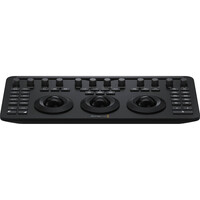
Blackmagic Design DaVinci Resolve Micro Color Pane
$765.00
Make 4 interest-free payments of $191.25 fortnightly and receive your order now.
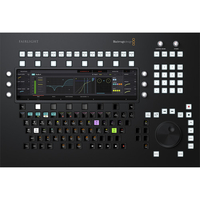
Blackmagic Design Fairlight Console Audio Editor
$7,035.00
Make 4 interest-free payments of $1,758.75 fortnightly and receive your order now.
Blackmagic Design DaVinci Resolve Studio (Dongle)
$469.00
Make 4 interest-free payments of $117.25 fortnightly and receive your order now.
Want to stay in the loop?
We'll keep you updated with the latest deals, so that you'll never miss out!
Secure Shopping

Get Connected

Shop Now. Pay Later.
Always interest-free.

Add your favourites to cart

Select Afterpay at checkout

Log into or create your Afterpay account, with instant approval decision

Your purchase will be split into 4 payments, payable every 2 weeks
All you need to apply is to have a debit or credit card, to be over 18 years of age, and to be a resident of country offering Afterpay
Late fees and additional eligibility criteria apply. The first payment may be due at the time of purchase
For complete terms visit afterpay.com/terms